6 AI Face Shape Detector Apps Compared (2026)
AI face shape apps suggest your shape from a selfie. Six compared on how they work, privacy and price, plus what your face shape is actually useful for.
One app says you have a round face. You try another, and it says heart. A friend swears you're an oval.
None of them is lying, and that's the part the face shape apps won't tell you.
Face shape isn't a fixed, scientific fact. It's a styling convention, and where you fall between "round" and "heart" is often a judgment call. AI face shape detectors are handy for picking glasses and haircuts, but only if you understand what they actually do, why their accuracy claims are shaky, and which ones are worth your selfie.
This guide covers how the tech works, six apps in 2026, the ones pretending to be face shape apps, and what to do once you know your shape. We make Coloris, so it sits in its own labeled section instead of the ranking, and the six apps were picked and sorted from what each company publishes, not from tests of our own (the criteria are below).
What a Face Shape App Looks At (and Why It's Not Science)
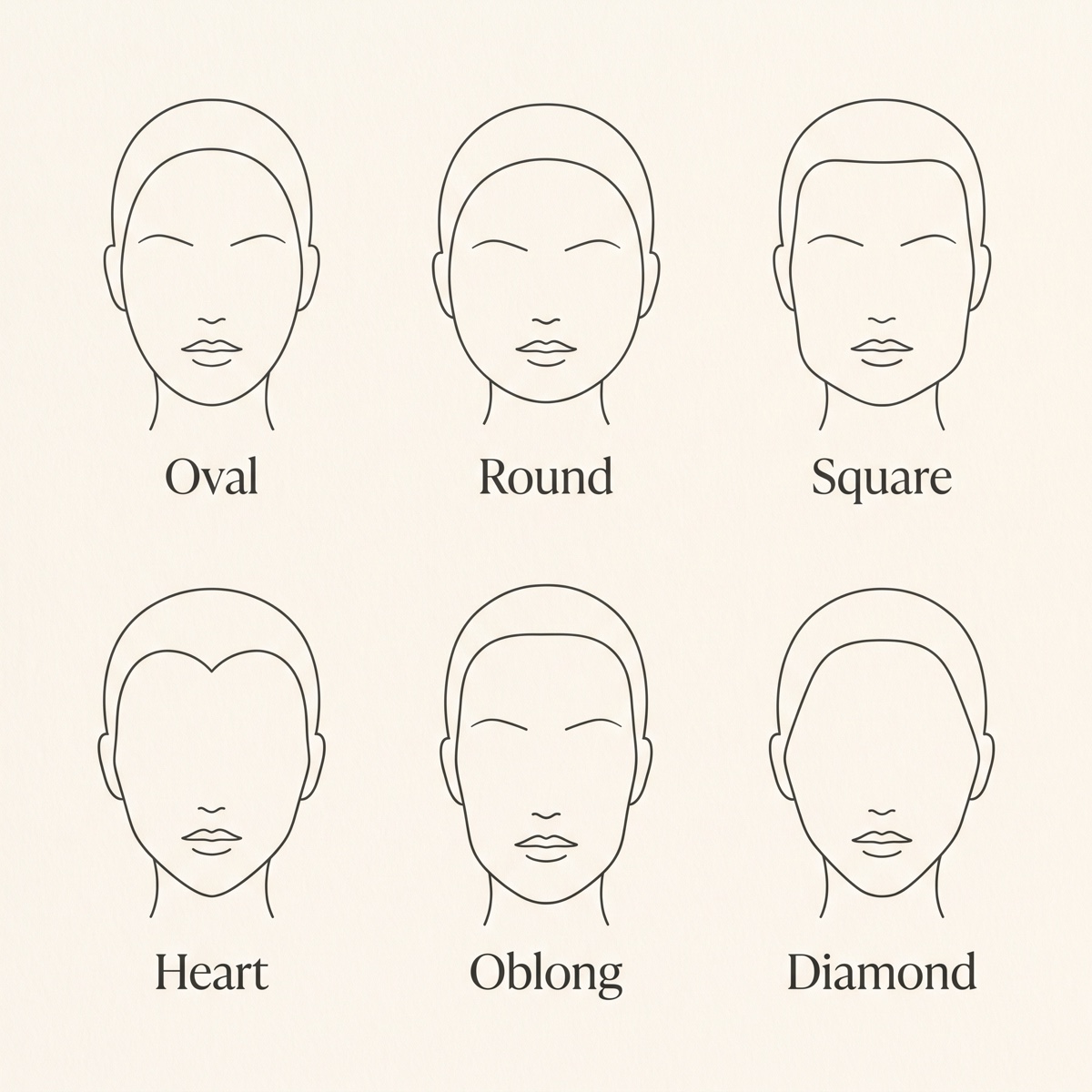 Face shape chart showing oval, round, square, heart, oblong and diamond face shapes
Most face shape tools work from the same four measurements: the width of your forehead, cheekbones, and jaw, plus the length of your face, along with how sharp or soft your jaw is.
From those they sort you into one of the classic shapes:
- Oval: length noticeably greater than width, gentle taper
- Round: length and width similar, soft curves, no hard angles
- Square: forehead, cheeks, and jaw near-equal width with a strong, angular jaw
- Rectangle / Oblong: like square but distinctly longer than wide
- Heart: wide forehead narrowing to a pointed chin
- Diamond: narrow forehead and chin, widest at the cheekbones
- Triangle: a wide jaw tapering up to a narrower forehead
Here's the honest bit. There is no official face shape taxonomy. Beauty publications and opticians use anywhere from five to eight shapes; scientific studies of facial form don't use these names at all. The "shape" an app gives you is a styling label, not a medical or scientific classification.
Two things follow: most guides pick a different number of categories, and most real faces are combinations that sit on the border between two. Your result is the dominant pattern, not a box you have to fit.
How AI Detects Your Face Shape, and How Much to Trust It
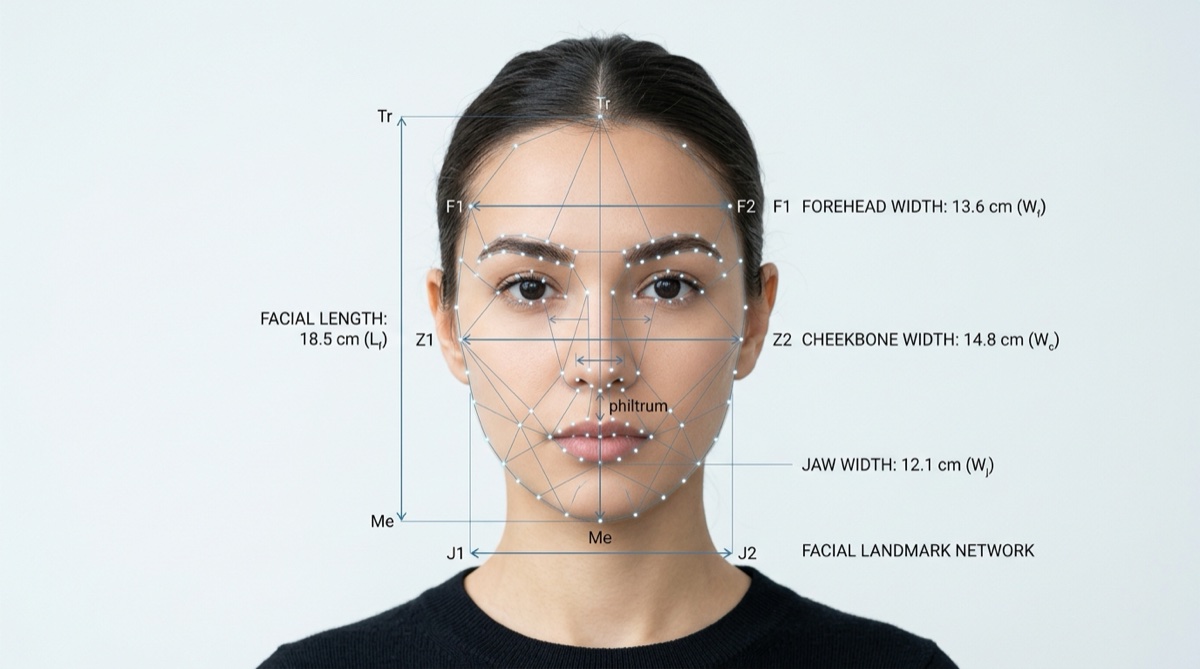 Illustration of a landmark-based face shape detector marking forehead, cheekbone and jaw width on a portrait
There are two broad approaches.
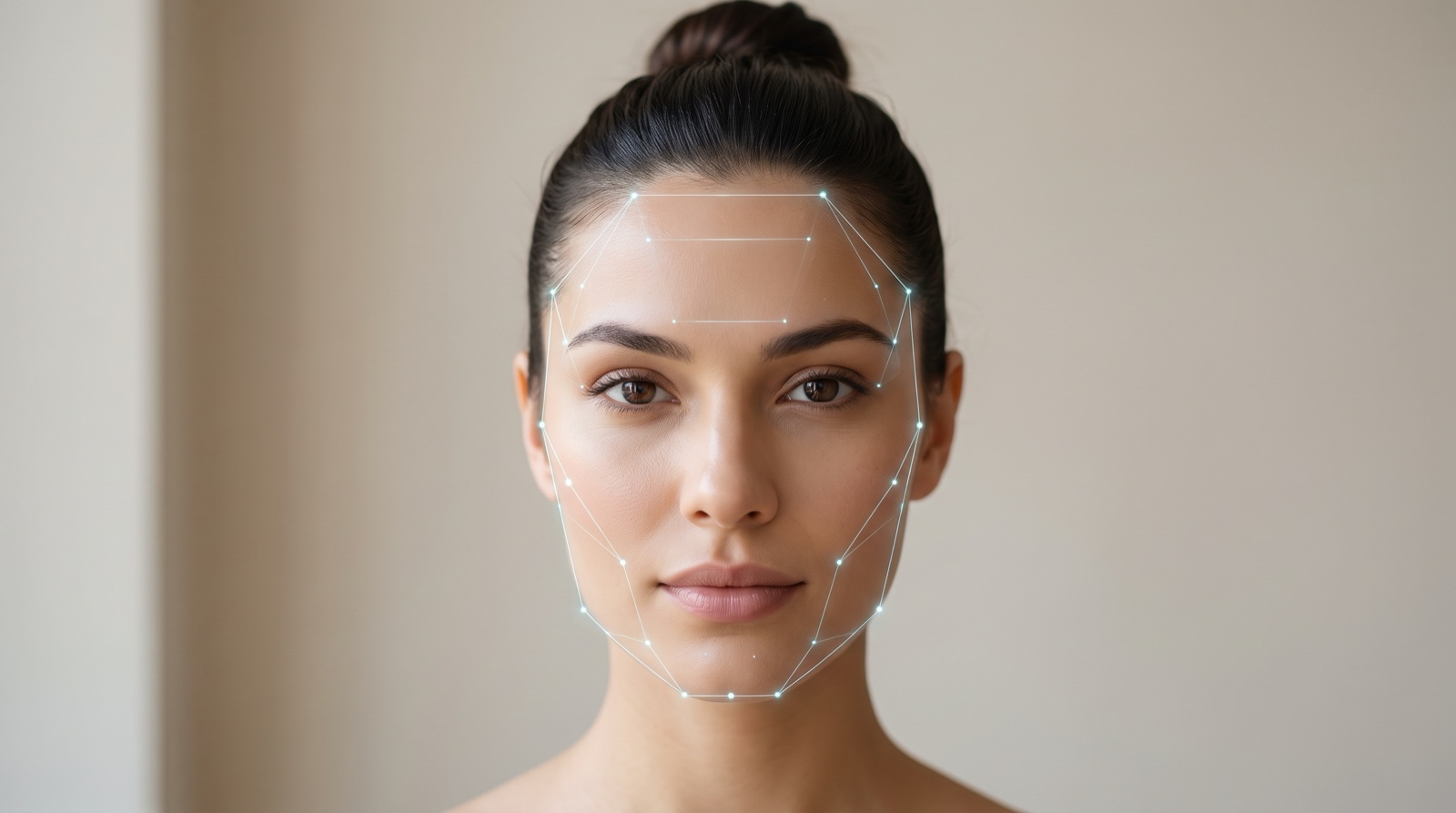
Landmark detectors run four steps: find your face, place facial landmarks, calculate the ratios and jaw angle, then classify the shape. Older ones plot around 68 points; newer ones built on Google's MediaPipe place 478 3-D points, which copes better with a slightly tilted head. Our free face shape detector works this way. More points mean more precise measurement, but not necessarily a more correct label.
General AI models look at the whole photo and name a shape without measuring anything. The Coloris app's face shape reading works this way, using Google's Gemini. It can explain its call in words, but it's a judgment read from pixels, not a measurement.
Now the accuracy claims, which you should treat carefully.
You'll see accuracy figures quoted for face shape AI, some of them very high. An accuracy figure only measures how often the AI agrees with whoever labeled the test photos, and those labels are themselves judgment calls. Since people disagree on borderline faces, two good tools can legitimately give you different shapes.
Three things break these tools in practice:
- Hair over the edges of your face is a common source of error. A tool can't read a jaw or forehead it can't see.
- Photo angle: a tilted or profile shot distorts every ratio. Straight-on only.
- Harsh lighting casts shadows that fake a different jawline.
The honest takeaway: an AI face shape reading is an informed estimate, most dependable when your face is clearly one shape, and fuzzy when it isn't.
How We Sorted This List
We sorted each app on how it works (true AI-from-photo versus a quiz or a symmetry gimmick), privacy (does your selfie leave your device?), price transparency, and whether it tells you what to do with your shape. We used what each company publishes and haven't run side-by-side tests, so check each site for current features and pricing.
6 AI Face Shape Detector Apps Compared
| App | How it works | Shapes | Privacy | How it charges | Good for |
|---|---|---|---|---|---|
| FaceShapeDetector.app | AI, on-device (MediaPipe) | 7 | On-device, no upload | Free | Free + private |
| YouCam (Perfect Corp) | AI + AR try-on | 9 | Cloud | Free web; paid app features | Virtual hair/glasses try-on |
| Hiface | AI-from-selfie app | Not stated | Cloud | Free + subscription | A dedicated styling app |
| MyFaceShape | AI, on-device (Apple Vision) | Not stated | On-device | Free | Free + private on iPhone |
| FaceShapeDetector.com | AI, server-side | Not stated | Upload, then deleted | Free (ads) | A quick no-frills read |
| Qoves Studio | AI + human review | Not stated | Cloud | Paid report | Deep facial analysis |
1. FaceShapeDetector.app: Free and Private
This is the one to beat on privacy. It runs entirely in your browser using Google's MediaPipe mesh, and nothing is uploaded to a server. It classifies seven shapes and adds hairstyle, glasses, and makeup tips.
It's free with no account, and transparent about its method. The limits: it's browser-only, and (like all of them) its shape-bucketing thresholds are still a judgment call. For a free, private first read, it's hard to beat.
2. YouCam by Perfect Corp: For Virtual Try-On
If you'd rather see the result than read a label, YouCam is the pick. From Perfect Corp, a major name in beauty AR, it detects nine shapes and layers on real-time AR try-on for hairstyles and glasses that move with your head.
The web detector is free. The caution: check what the full app costs before you subscribe, and take any "trained on N faces" marketing with a pinch of salt.
3. Hiface: A Dedicated Styling App
Hiface is a polished, purpose-built app that ties your face shape to hair, beard, glasses, and makeup suggestions, with virtual hairstyle try-on.
The trade-off is the paywall: it's subscription-based, with credits for extra scans. Read the plan terms before you subscribe.
4. MyFaceShape: Free On-Device for iPhone
MyFaceShape does its detection fully on-device using Apple's Vision framework, so your photo never leaves your phone. It's free and private, the iOS counterpart to FaceShapeDetector.app.
It's newer, with fewer styling extras and a shorter track record, but for iPhone users who want a private, no-upload check at no cost, it fits.
5. FaceShapeDetector.com: The Free Original
A long-running name in the category. Upload a selfie, get your shape plus hairstyle, sunglasses, and makeup suggestions. It's free, ad-supported, and states your photo is deleted after analysis.
It's a server-upload tool (less private than the on-device options) and vague about its method and shape list, but it does the basic job for free.
6. Qoves Studio: Deep Facial Analysis (With a Caveat)
Qoves pairs AI with review by a human team, but face shape is just one output in a full facial-aesthetics report aimed at "improving your looks."
It's a paid report rather than a free read, and its looksmaxxing-style framing makes it a very different, more psychologically loaded product than a styling tool. Right for someone who wants a deep facial assessment; overkill, and tonally heavy, if you just want a haircut.
Not actually face shape apps (despite ranking for it): StyleDNA does color and body-type analysis, not face shape. Golden-ratio / "symmetry score" apps rate attractiveness, not shape. And pay-per-search detectors that show "Free" then charge to reveal your result are worth skipping when free on-device tools exist.
Where Coloris Fits (We Make It, So It Isn't Ranked)
Coloris has two parts that matter here:
- The free face shape detector runs in your browser using MediaPipe face landmarks. It measures proportions on your device, names one of seven shapes, and tells you when you sit between two. The photo never leaves your device.
- The Coloris app sends your selfie to Google's Gemini AI, which names your face shape with a short reason. Separate hairstyle and eyewear readings suggest cuts and frames to try. It's a label, not a measurement, so lighting, angle, and hair can shift it.
The app now leads with color: your colors shown live on the top you're wearing, and a check for clothes before you buy. Your first reading is free, no card needed, and most people start with their colors; more readings come with a plan, from $2.99 a week. The photo is stored encrypted in your account, never sold, never used for ads or to train AI models, and you can delete it anytime.
Where it falls short: the app's face shape reading uploads your photo, where the free detector doesn't; it's a label, not a measurement; it isn't part of the free first reading; and the iPhone app isn't out yet (the web and Android apps are). For a private first read, start with the free detector.
What Your Face Shape Is Actually For
A label alone is trivia. Its value is in the styling ideas it gives you. Stylists and opticians mostly work from one idea, contrast: a frame or cut with different lines from your face shape tends to stand out nicely against it. It's a starting point for trying things, not a rule, and no face shape needs correcting.
Glasses: The Clearest Guide
 Choosing eyeglass frames that suit your face shape
Opticians are fairly consistent here: frames that contrast with your face shape are a good place to start, about as wide as the widest part of your face.
- Round face → rectangular and angular frames make a nice contrast with soft curves
- Square face → round or oval frames, thin rims or rimless, contrast with defined angles
- Heart face → rounded or bottom-heavy frames (aviators), in light or thin rims
- Diamond face → oval and cat-eye frames that echo your cheekbones; rimless and browline styles
- Oval face → most shapes work, so pick by style and match your widest point
The free glasses finder goes deeper: frame shapes for each face shape, and the fit numbers that matter more.
Hair and Necklines
- Round → height on top and length past the jaw; deep side parts; V-necklines
- Square → soft waves and a wispy fringe frame a defined jaw; scoop and sweetheart necklines
- Heart → chin-length lobs and curtain bangs; sweetheart necklines that mirror the shape
Once you know your shape, the face shape detector explains each one and how to measure yours, and the free hairstyle finder shows cuts by shape.
Privacy: Where Does Your Selfie Go?
It's your face, so the question matters: does the tool process your photo on your device, or upload it to a server?
- On-device (FaceShapeDetector.app, MyFaceShape, our free face shape detector): the image never leaves your phone or browser. The strongest privacy position.
- Server-side (most others, including the Coloris app): your photo is uploaded for analysis. Some delete it straight after; others, like Coloris, store it in your account so your history works. Either way, you're trusting their stated policy.
Neither is "wrong," but if privacy is your priority, favor an on-device tool, and check any uploader's privacy policy before you tap.
How to Get a Clearer Result
Because photo quality drives the reading more than the app does:
- Face the camera straight on: no tilt, no profile.
- Pull all hair back off your forehead, ears, and jaw.
- Use soft, even light facing a window; avoid harsh overhead shadows.
- Keep a neutral expression: a big smile changes your cheek and jaw width.
Frequently Asked Questions
Q: Are AI face shape apps accurate?
They're an estimate, not a certainty. "Correct" is itself a judgment call, and borderline faces are genuinely ambiguous. Treat your result as a starting point; it's most dependable when your face is a clear example of one shape.
Q: Why do different apps give me different face shapes?
Because there's no standard taxonomy (tools use five to nine shapes), each uses different methods or training data, and most faces are combinations sitting between two shapes. A slightly different photo or angle can tip a borderline result. If two apps agree in a good straight-on photo, trust that far more.
Q: Are free face shape detectors as good as paid ones?
Often, yes. Photo quality matters more than price. A free on-device detector built on MediaPipe landmarks can give you a usable read. What you pay for is usually extras: virtual try-on, styling suggestions, saved results.
Q: Is it safe to upload a photo of my face?
With on-device tools, nothing is uploaded at all. With server-based tools, your photo is sent for analysis; check the privacy policy for whether it's deleted, stored, sold, or used for training. If it worries you, pick an on-device option.
Q: What is the rarest face shape?
You'll often see "diamond" cited as rarest, but that's a beauty-blog claim without solid research behind it, since scientific studies don't sort faces into these categories at all. Don't put much weight on rarity rankings.
Q: Can I use a face shape app before a haircut or buying glasses?
That's what they're good for. Knowing your shape gives you and your stylist or optician a shared starting point: which lines contrast with yours, and which lengths and frames to try. Bring the result as a starting point, not a rule.
The Bottom Line
AI face shape apps in 2026 are a useful first step for styling, as long as you remember the label is a convention, the accuracy is an estimate, and most faces live between two shapes. Pick an on-device tool if privacy leads; pick a try-on tool if you'd rather see it; pick an all-in-one if you want styling suggestions, not just the label.
 Woman using an AI face shape app to choose a hairstyle that suits her
Want a private first read? The free face shape detector runs in your browser, and the photo never leaves your device. Then, in the Coloris app, see your colors on what you're wearing, live, or check a piece before you buy. Your first reading is free, no card needed, and a plan adds hairstyle and frame suggestions from your selfie.
執筆:Coloris チーム。調査と下書きには AI ツールを使い、公開前にすべてのガイドをアプリの実際の動作と照らし合わせて確認しています。 私たちについて